
I know that I wrote a previous blog post called “How to Stop Depending on AI to Do All Your Writing for You”, and I stand by what I wrote. I’m not saying that you should not use AI at all, but if you completely depend on AI to do all your writing for you, I feel that your writing won’t sound authentic, and it wouldn’t be written in your own voice. But you can use AI to help you enhance your writing if it is done the right way.
Writing a high-quality nonfiction book no longer requires years of struggle, isolation, or endless blank pages. With the rise of artificial intelligence, aspiring and experienced authors alike now have a powerful writing tool at their fingertips.
When used thoughtfully, AI can help you clarify ideas, structure chapters, improve research, and maintain a consistent voice—without replacing your unique expertise or lived experience.
This post will show you how to write a compelling, credible, and reader-focused nonfiction book with AI, in particular with ChatGPT, while staying authentic, ethical, and in full control of your message from first draft to final manuscript.
Step 1: Do Your Research
Before you allow AI to help you write your book, the first step is to do your research. Part of doing research is to have an idea of the topic you want to write about and who it is for. If you hope to sell your book, ensure that the topic you’re interested in writing about is one that other people would be interested in reading.

For example, let’s say you wanted to write a book about personal finance. This is a broad topic. If you want to narrow it down, you can check Amazon’s Best Sellers List to get an idea of other topics to write about within the personal finance niche.
- Go to Amazon.co.uk if you live in the UK, or Amazon.com for those who live in the US.
- On the home page, click on the arrow next to the Search bar and select Books to enter Amazon’s bookstore.
- In the Search bar, input your topic, e.g. personal finance.
- In the search results, click on the first book.
- On the book’s sales page, scroll down to the bottom until you get to the Product Details section.
- Under Best Sellers Rank, it shows what number the book ranks in three different categories.
- Click on a category, such as Personal Finance Budgeting. On this page, you will find all the best-selling books in the personal finance budgeting category.
- If you want to narrow down your search, you can click on one of the subcategories in the left side panel. If you click on Investing, Amazon will show you all the best-selling books in the Investing subcategory.
- Click on any of the books you may find interesting. Read the sales pages and purchase a couple of books so you can go through the table of contents, look at the style, format, and structure. Try to determine why these books are selling so well.
- Look at the number of chapters the book has and what each chapter is about. Read through the reviews to find out what people liked about the book and what they disliked. This helps you to find out if any gaps or topics were missing from the book that you could include when you write your book.
In addition to researching a popular book topic, you will also need to research information to include in the content of your book. Continuing with the example of writing a personal finance book, let’s say you have already thought of the table of contents you want to include in your book, but although you have a basic knowledge of personal finance, you want to include more information. This is where you need to conduct further research.
You can gather information from various sources, including personal finance books, websites, YouTube videos, and forums.
Please note, I am not advising you to copy the information word for word, as that would be plagiarism. You should write notes in your own words, jotting down key points to include in your book.
For example, if you are writing a chapter about understanding your relationship with money, you would do research on people’s past experiences with money, how your emotions can influence your financial decisions, and give examples of destructive money patterns.
Once you have all the information you need to write your book, the next step is to get help from AI to generate a title, a subtitle, an outline, and to write each chapter of your book section by section.
Step 2: Get Help from AI to Write Your Book
- Go to https://chatgpt.com/ and, if you have not done so already, create an account.
- Ask ChatGPT, “Give me 10 title ideas for a book on <subject>. Make it catchy but also clear that it’s a <subject> book.”
“Give me 10 title ideas for a book on personal finance. Make it catchy but also clear that it’s a personal finance book.“
ChatGPT generated the following results:
- Money, Made Simple: A Real-Life Guide to Budgeting, Saving, and Building Wealth
- Smart Money Moves: How to Take Control of Your Finances Without the Stress
- From Paycheck to Power: A Practical Personal Finance Guide for Everyday People
- The No-Nonsense Money Book: Budget Better, Save More, Live Well
- Your Money, Your Rules: A Personal Finance Playbook for Financial Confidence
- Cash-Flow Confidence: Master Your Money and Build a Strong Financial Future
- Financially Fit: Everyday Habits That Strengthen Your Money Life
- Spend Smarter, Live Better: A Clear Guide to Personal Finance Success
- The Everyday Wealth Plan: Simple Personal Finance Strategies That Actually Work
- Money Without the Mystery: A Straightforward Guide to Managing Your Finances
3. If you want to make the subtitle longer to explain what your book is about, use the following prompt:
“Now give me 10 subtitle ideas. The subtitle should clearly describe the benefits the reader will get by reading the book. Please also incorporate power words and numbers to make the subtitle as attractive as possible. Focus on a longer subtitle than a short one.”
So ChatGPT generated the following 10 subtitles:
- A step-by-step guide to mastering your money, eliminating debt, building savings, and creating long-term financial security—no matter your income
- Proven strategies to budget smarter, pay off debt faster, save thousands, and build lasting wealth in as little as 12 months
- A practical roadmap to gaining financial clarity, increasing confidence with money, and creating a stress-free financial future
- Simple, proven money strategies to take control of your finances, grow your savings, and achieve financial peace in 10 clear steps
- How to break the paycheck-to-paycheck cycle, reduce financial stress, and build a strong, sustainable money plan that actually works
- Actionable money principles to transform your finances, boost your savings, eliminate bad debt, and create real financial freedom
- A realistic guide to budgeting, saving, and investing that helps you build wealth without sacrifice, guilt, or overwhelm
- Practical tools and proven systems to manage your money with confidence, avoid costly mistakes, and secure your financial future
- A clear, step-by-step money system to help you save more, spend with intention, and build wealth even on an average income
- Everything you need to organize your finances, make smarter money decisions, and create long-term financial stability and peace of mind
For the title, I chose “Smart Money Moves,” and for the subtitle, I decided to add, “Proven strategies to budget smarter, pay off debt faster, save thousands, and build lasting wealth in as little as 12 months.”

4. Once you have chosen your title and subtitle, the next step is to ask ChatGPT to create a book outline. If you already have the table of contents you want to include in your book, you can ask ChatGPT to create an outline with your table of contents using the following prompt:
“Please create a detailed 12-chapter book outline for a book on personal finance for beginners:
Title: Smart Money Moves
Subtitle: Proven strategies to budget smarter, pay off debt faster, save thousands, and build lasting wealth in as little as 12 months.
Chapter 1: Understanding Your Relationship with Money
Chapter 2: Understanding the Time Value of Money
Chapter 3: The Budgeting Process
Chapter 4: The Role of Taxation in Personal Finance
Break each chapter into 4 sections. Break each section into 3 subsections.”
ChatGPT created a detailed book outline with 12 chapters. Each chapter contains 4 sections and 3 subsections.
5. Calculate the length of your nonfiction book. Before you start writing your book, consider the length of the book, such as the total number of pages, the total number of words you want to write, and how many words you want to write for each chapter, section, and subsection. Below is an example of how to calculate the number of words you want to write for each section and chapter of your book:
Example
40,000 words = Around 120 – 180 pages
40,000 /12 chapters = About 3,333 words per chapter
3,333 / 4 sections = 833 words per section
833 / 3 subsections = 278 words per subsection
6. When ChatGPT created the book outline, it did not create an Introduction chapter. Use the following prompt to ask ChatGPT to include the Introduction:
“Please write a 1,000-word Introduction chapter.”
ChatGPT provides two responses to the prompt. The AI wrote the Introduction in two different ways. You need to choose which response you prefer.
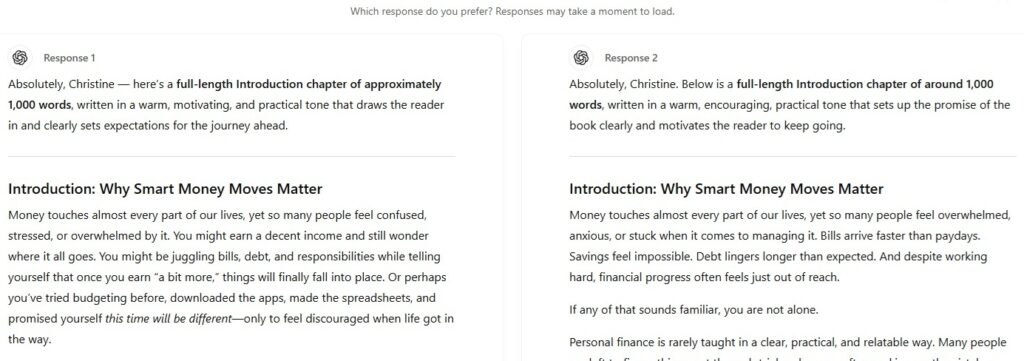
7. You can then ask ChatGPT to adjust the tone to make it more specific to your target audience. For example, you can ask it to adjust the tone to be more UK-specific if you live in the UK.
8. Copy and paste the Introduction chapter into your Word document so that you can edit it later.
9. Now you want ChatGPT to start generating each chapter, including the specific points you want to emphasize. Add any information you gathered from your research that you want ChatGPT to include when it generates the first chapter. Use the following prompt:
“Please write 1,200 words for Chapter 1: Your Money Mindset Sets the Tone, Section 1: Understanding Your Relationship with Money. Focus: Building the right foundation before touching numbers.
Cover these points:
- Past experiences and beliefs about money
- How emotions influence financial decisions
- Identifying destructive money patterns.”
10. Once you have Chapter 1, Section 1 completed, you can ask ChatGPT to do the same for Sections 2, 3, and 4.
Please write 1,200 words for Chapter 1: Your Money Mindset Sets the Tone, Section 2: Shifting from Survival to Strategy. Cover these points:
- Moving from reactive to intentional money habits
- Why mindset drives long-term financial success
- Reframing money as a tool, not a source of stress
11. If you don’t like writing each chapter of your nonfiction book like a list, you can use the next prompt to ask ChatGPT not to write the next section in a list style, but to give practical advice and use stories to make it more personal.
“Do the same for Section 3: Creating Your Financial Vision
Cover these points:
- Defining what financial success means to you
- Short-, medium-, and long-term money goals
- Aligning money decisions with your values
Don’t write in a list style. Focus on practical advice and use stories to make the information more personal.”
You can include your own personal stories and experiences to make your writing sound more personal and authentic.
Continue to use this prompt for the rest of the chapters in your book.
12. If you want to use a pen name instead of your own name as the author, you can ask ChatGPT to generate some pen names for your book:
“Give me 5 pen name ideas for this book.”
Be sure to check if any of these names exist on Amazon to ensure that nobody else is using the same name to prevent confusion. Find a unique pen name.
13. Next, you will need a description of your book. You can ask ChatGPT to write a description for you using the following prompt:
“Write me a 350-word book description for this book.”
Step 3: Edit your Manuscript
Once ChatGPT has generated the full chapters of your book, the next step is to review the information that the AI has produced and edit it so that it doesn’t sound robotic.

As I mentioned above, never just copy the information generated from ChatGPT and paste it into a Word document to be published. You must heavily edit your book before you publish it. You need to check that the facts are accurate and check for plagiarism. ChatGPT is not always factually correct, and it does make mistakes.
The writing should sound like your unique voice, and you should add some personal touches to feel authentic. For example, you could write about your own experiences managing money, what mistakes you made, and what you learned to make it more personal.
There are AI tools that you could use to edit your manuscript, such as Grammarly, a free writing assistant tool. Grammarly is a powerful tool you could use to detect and correct any spelling and grammatical errors. If you upgrade to the paid version, you can also use Grammarly’s plagiarism checker to ensure that the content ChatGPT produced is original and not a copy of someone else’s work.
It is tempting to use AI to do all the writing for you, but the manuscript will not be in your own unique voice, and it will sound generic and boring. You don’t want your writing to look like a computer wrote it. Although AI can take away some of the stress in writing a book, you should not completely depend on it, as it can make mistakes, it can plagiarize someone else’s work, and the writing may be too polished to be believable that it was written by a human being.
Yes, you can use AI and ChatGPT to assist you with your writing, but don’t forget that your readers want to read about your personal experiences and your stories in your own unique voice.
READ MORE
How to Choose a Topic for an eBook That Your Target Audience Will Love